Blog
Are There Safer Alternatives to SMS Two-Factor Authentication?
10 min read
Last Updated: October 25, 2026
Quick Summary
Safer alternatives to SMS two-factor authentication include authenticator apps, passkeys, and hardware security keys. Authenticator apps generate codes locally so no message is sent, while passkeys and hardware keys are phishing resistant because they bind the signature to the actual website domain. For high-risk accounts, we recommend hardware security keys.
- SMS codes travel over a channel the account owner does not control, and the phone number is the weak point.
- TOTP authenticator apps compute a six-digit code locally that refreshes every 30 seconds, so they work offline.
- Passkeys and hardware security keys are phishing resistant because the signature is tied to the real domain.
- Buy and register two hardware keys, storing the backup somewhere other than your laptop bag.
- Enroll the new factor and confirm a login before removing SMS to avoid locking yourself out.
Table of Contents
- Why SMS Two-Factor Authentication Is Still a Weak Link
- Authenticator App vs SMS: What Changes for Your Security
- Passkeys vs SMS Authentication: The Phishing-Resistant Option
- Hardware Security Key Two-Factor Authentication for High-Risk Accounts
- Backup Codes for Two-Factor Authentication and Device Loss Planning
- Comparing the Alternatives: Security, Cost, and Usability
- Choosing Your Next Login Method and Reducing Your Data Exposure
- Frequently Asked Questions
Why SMS Two-Factor Authentication Is Still a Weak Link
SMS two-factor authentication sends a one-time password to your phone by text message, and it remains the weakest widely deployed second factor in 2026. The code travels over a channel the account owner does not control. This guide covers alternatives to SMS two factor authentication that change the threat model, from authenticator apps to passkeys and hardware keys.
Here is the part most guides skip. The code is not the weak point. The phone number is.
How SMS codes get intercepted
Text messages are not encrypted end to end. They move through carrier infrastructure designed for delivery, not secrecy, and interception ranges from SIM-level attacks to social engineering of a support agent.
The University of Tennessee security guidance notes that the FBI and CISA advised against using SMS codes for MFA and 2FA in December 2024. That advice was not theoretical caution.
SIM swapping and number porting explained
SIM swapping is an attack where someone convinces your carrier to port your number to a SIM they control. Number porting is the legitimate process that makes it possible. Once the port completes, every text and call to your number lands on the attacker's device.
A common mistake is assuming a carrier PIN closes this gap. The Department of Defense guide to multifactor authentication solutions notes that PINs or passwords used to activate an authenticator device are typically 6 to 8 characters, which is a short barrier against a determined attacker with your basic personal details.
Authenticator App vs SMS: What Changes for Your Security
An authenticator app generates codes locally on your device instead of transmitting them, removing the interception channel.
How TOTP codes work offline
Most authenticator apps use the time-based one-time password, or TOTP. During enrollment, the service and your app share a secret key, and both compute the same six-digit code from that key and the current time, refreshing every 30 seconds.
No message is sent and no carrier is involved, so a code generated in airplane mode still validates. The trade-off is enrollment: lose the device before backing up the secret, and you lose access.
Passkeys vs SMS Authentication: The Phishing-Resistant Option
Passkeys replace the shared secret with a cryptographic key pair, and the private half never leaves your device.
A passkey login has no OTP, no text message, and no typing.
That is why security guidance keeps pushing this direction. Yubico's 2026 global authentication survey recommends switching to passkeys, moving away from SMS-based verification, and considering hardware security keys.
Where passkeys fall short is device portability. Synced passkeys move between devices inside one ecosystem. Hardware-bound passkeys do not. Plan for that before you enroll.
Hardware Security Key Two-Factor Authentication for High-Risk Accounts
A hardware security key is a small physical device that stores credentials and signs authentication challenges over USB or NFC.
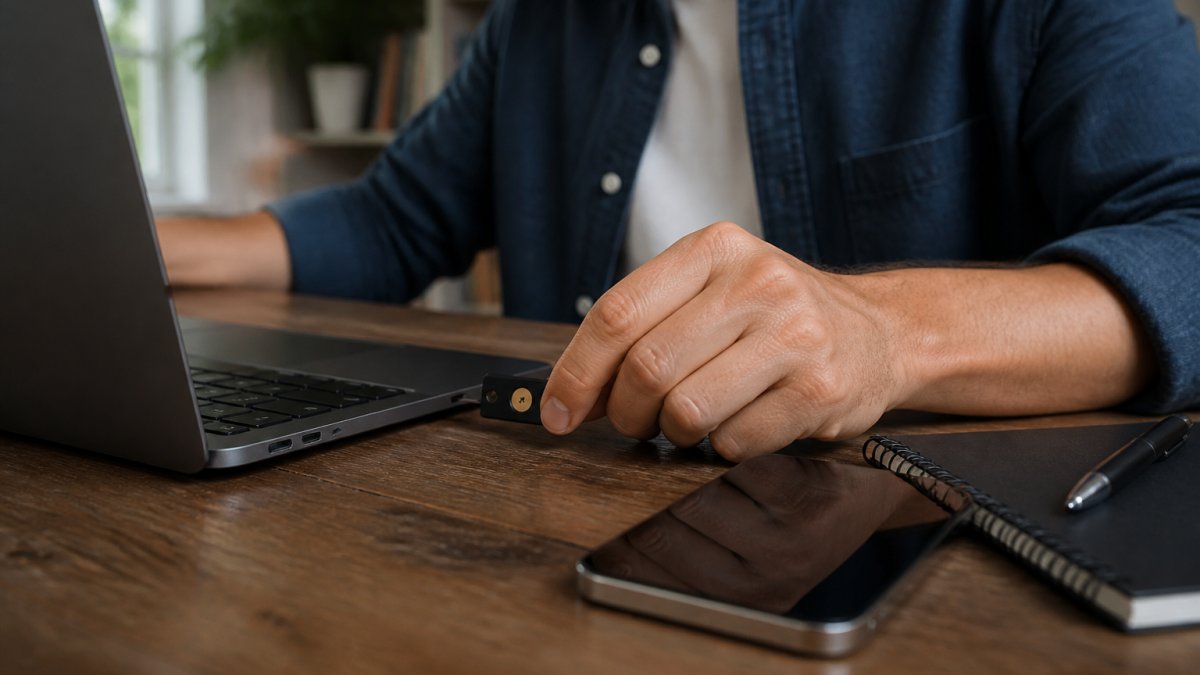
A key cannot be phished, because the browser verifies the domain before the key signs anything. It cannot be cloned over the network or ported by a carrier agent.
Backup Codes for Two-Factor Authentication and Device Loss Planning
Backup codes for two-factor authentication are single-use recovery codes issued at enrollment that let you sign in when your primary device is unavailable. They decide whether a lost phone becomes a locked account, so plan the recovery and migration path before you need it.
What to do when your phone or key is gone
Work through this in order, and do it before you need it:
- Retrieve your saved backup codes from wherever you stored them offline
- Sign in with one code, then immediately regenerate the full set
- Revoke the lost device's sessions from the account security settings
Store codes separately from the device they protect. A password manager works; a screenshot in your camera roll does not, because it travels with the phone you just lost.
Recovery options compared
Backup codes are one recovery path among several, each with a different failure mode. Register more than one so a single lost device does not become a lockout.
- Backup codes. Single-use, offline, and independent of any device. They fail if you lose the printout or store them on the device you lost. Regenerate them after every use.
- Recovery contacts. Some services let you designate a trusted person who can vouch for you. This depends on that person being reachable and willing.
- Replacement-device workflows. Passkey ecosystems often sync across devices in the same account, easing replacement but tying recovery to that ecosystem. Hardware-bound passkeys and physical keys do not sync, so a spare key is the recovery plan.
Migration planning: switching away from SMS without locking yourself out
The riskiest moment in moving off SMS is the transition itself. These practices reduce the chance of a lockout:
- Enroll the new factor before removing SMS. Register the second factor while SMS is still active, confirm a successful login with it, then remove SMS.
- Register a spare. For hardware keys, buy and register two. For authenticator apps, back up the secret or use an app that supports encrypted backup.
- Test the recovery path. Sign out and sign back in using a backup code once, so you know the code works and where it is stored.
- Harden the recovery channel. An attacker who controls your recovery email or phone number can often reset the account regardless of your second factor. Update those to channels you control before you migrate.
- Document the fallback. For a household or team, write down who holds the spare key and where the backup codes live, so recovery does not depend on one person's memory.
The lockout risk nobody plans for
The strongest second factor is also the easiest to lock yourself out of. A hardware key that cannot be cloned cannot be duplicated if you lose it, and a passkey bound to one device does not travel to the next.
Comparing the Alternatives: Security, Cost, and Usability
No single method wins on every axis, so match the method to the account's value and the threat you are trying to defeat. The table is a starting point; the threat-model discussion underneath is where the real decision gets made.
| Method | Phishing resistant | Resists SIM swap | Works offline | Recovery burden | Best for |
|---|---|---|---|---|---|
| SMS OTP | No | No | No | Low (carrier-dependent) | Low-value accounts only |
| Authenticator app (TOTP) | No | Yes | Yes | Medium (secret backup) | Everyday accounts |
| Push notification | Partly | Yes | No | Medium | Convenient daily logins |
| Passkey | Yes | Yes | Yes | Medium to high (sync/device) | Consumer accounts, most users |
| Hardware security key | Yes | Yes | Yes | High (need a spare key) | Email, banking, admin access |
Match the method to the threat
The useful question is not "which method is most secure" but "which threat am I actually trying to stop." That framing settles the choice faster than a feature checklist.
- SIM swapping and number porting. Any method that does not depend on the carrier defeats this: authenticator apps, push, passkeys, and hardware keys all remove the porting path. SMS does not.
- Phishing and real-time code relay. Only phishing-resistant methods close this door. Passkeys and hardware security keys bind the signature to the actual domain, so a lookalike site gets a signature that will not validate. TOTP and push codes can still be read aloud to a caller or approved on a fatigue prompt.
- MFA fatigue and push bombing. Push notification adds convenience but trains users to approve a prompt, which is exactly what fatigue attacks exploit. Number matching and additional context in the push prompt reduce this, but they do not eliminate it.
Accessibility and real-world usability
Convenience is not a single score, and treating it as one hides the users who get locked out. Consider:
- No smartphone. Hardware security keys and passkeys on a desktop or tablet give these users a path that does not depend on a carrier or a mobile app.
- Limited connectivity. TOTP authenticator apps and hardware keys work offline; push and SMS do not.
- Assistive technology. Passkeys that rely on a platform biometric may not fit every user's setup. Hardware keys with a physical touch step are often the more predictable option for users who need a consistent, tactile interaction.
Organizational rollout and total cost
For a business choosing an alternative at scale, the per-user license is rarely the largest line item. The bigger costs are enrollment, support, device provisioning, and fallback policy.
- Enrollment. Every user who moves off SMS needs a registration step, and some will need help. Budget support time for the first cohort.
- Device provisioning. Hardware keys have a per-device cost and a logistics cost; passkeys shift that burden to the user's existing devices but require a platform that supports them.
- Fallback policy. Decide in advance what happens when a user loses their device. A documented fallback (backup codes, a help-desk identity check, or a temporary alternate factor) prevents ad-hoc workarounds that quietly reintroduce SMS.
The pattern is worth naming. Push notification adds convenience but trains you to approve a prompt, which is what MFA fatigue attacks exploit.
Choosing Your Next Login Method and Reducing Your Data Exposure
Start with your email account, because it can reset everything else. Add a passkey or hardware key there first, then work outward to banking and any account holding payment details.
Authentication is one layer. The other is the personal information already sitting on data broker sites, which is often enough to answer the security questions guarding an account. That is the layer cybersweep analytics works on.
Get started with cybersweep analytics and take the first step toward reducing your online exposure.
Frequently Asked Questions
What is the best alternative to SMS two-factor authentication?
For most people, an authenticator app is the easiest step up from SMS two-factor authentication. It generates time-based one-time passwords on your device and does not rely on your phone number, so SIM swapping does not expose the code. Passkeys and hardware security keys go further by resisting phishing, but they require more setup and recovery planning. The best choice depends on which accounts you are protecting and how much friction you can tolerate.
Are authenticator apps safer than SMS for two-factor authentication?
Yes, in most cases. An authenticator app keeps the one-time password on your device instead of sending it over the cellular network, which removes the number-porting and SIM-swap attack path. That said, an authenticator app can still be phished if you type a code into a fake login page. Hardware security keys and passkeys address that gap because they check the website's actual address before authenticating.
How do passkeys compare with SMS verification?
Passkeys replace the password and the texted code with a cryptographic key stored on your device, unlocked by a fingerprint or face scan. Because the key is tied to the real website, a phishing page cannot capture it. SMS verification sends a code that can be intercepted or replayed. Yubico's 2026 survey recommends moving to passkeys and away from SMS-based verification, though support still varies by service.
What should I do if I lose my phone or security key?
Set up recovery before you need it. Save backup codes for two-factor authentication in a password manager or a printed copy stored securely, and register a second device or key where the service allows it. If you lose your only method, use the backup codes or the account recovery workflow the provider offers. Some services require identity verification, which can take time, so keep at least one spare method active.